
 Tweet
Tweet
 What's New in the New Forums???
First off, A list of things that are the same:
1. Your user name and password from the old forums should work
2. The list of forums and threads should be the same.
3. Your post history should be intact.
4. Your Profile is still customizable and is located by following the "USER/CP" (control panel) button at the top of every page.
New Stuff:
1. This forum is PHP/mySQL based and should be noticeably faster.
2. Searching is greatly improved. You can now easily find member posting histories by clicking on usernames and user profiles.
3. Members panel - A list of all registered members, their home pages and posting history.
4. Who's online - At the bottom of the front page, a list of who's logged in and how many others are lurking. If you click the text "Currently active users" you will see a list of what each browser is actually looking at.
5. Calendar - If you edit your PROFILE page to include your birthday, it will show up on the calendar and you will receive a happy birthday notice on the front page. The calendar is also a place to post upcoming gigs and events for the community.
6. Polls - There is a polling system built right into the forums now. Look for upcoming polls to start popping up.
7. Posting - there is a "preview" feature now so you can review what you're about to post. After composing your message, click the "Preview message" button to the right of the "Post message" button and you'll see how your composition looks before posting.
8. You can now subscribe to threads and be notified by email when a new post occurs.
9. There is a rating system for you to vote on the usefulness or coolness of a particular thread.
10. Avatars - You are able to assign a picture to appear under your user name. More info coming soon.
11. TIME ZONES!!!- You may now specify what time zone you're browsing in! Go to your PROFILE (USER/CP button) and click on "Edit Options" and make the change to specify where you are. This should give you the times of posts relative to your time zone! Yay!
12. View Recent Posts - This will give you a list of all posts since you last logged in. Or a list of all posts you haven't read SINCE you logged in. It's not "Daily" topics anymore. If you want to see "Today's Active Topics" You need to log out and THEN go look at the front page. If you're logged in, you only get posts you haven't seen yet. If you're not logged in, the system assumes you're a guest and gives you the day's "Latest topics."
There will be more coming soon.
What's broken?
Links- I know for sure that some of the links within old posts that refer to old forum threads will be broken. If you are trying to follow a thread link and get a broken link, there's not much to do about it. However, if you know what the thread is about, the new search function on these forums is very powerful and you'll probably be able to find what you're looking for with a simple search.
Quotes - The old UBB code seems to have been a little messed up in the import. If you are reading a thread and find messed up quote tags, you can go ahead and edit the post if it is your own. Or let me know and I'll go in a fix it. Bold and italics tags may be a little messed up on old threads, too.
1. Your user name and password from the old forums should work
2. The list of forums and threads should be the same.
3. Your post history should be intact.
4. Your Profile is still customizable and is located by following the "USER/CP" (control panel) button at the top of every page.
New Stuff:
1. This forum is PHP/mySQL based and should be noticeably faster.
2. Searching is greatly improved. You can now easily find member posting histories by clicking on usernames and user profiles.
3. Members panel - A list of all registered members, their home pages and posting history.
4. Who's online - At the bottom of the front page, a list of who's logged in and how many others are lurking. If you click the text "Currently active users" you will see a list of what each browser is actually looking at.
5. Calendar - If you edit your PROFILE page to include your birthday, it will show up on the calendar and you will receive a happy birthday notice on the front page. The calendar is also a place to post upcoming gigs and events for the community.
6. Polls - There is a polling system built right into the forums now. Look for upcoming polls to start popping up.
7. Posting - there is a "preview" feature now so you can review what you're about to post. After composing your message, click the "Preview message" button to the right of the "Post message" button and you'll see how your composition looks before posting.
8. You can now subscribe to threads and be notified by email when a new post occurs.
9. There is a rating system for you to vote on the usefulness or coolness of a particular thread.
10. Avatars - You are able to assign a picture to appear under your user name. More info coming soon.
11. TIME ZONES!!!- You may now specify what time zone you're browsing in! Go to your PROFILE (USER/CP button) and click on "Edit Options" and make the change to specify where you are. This should give you the times of posts relative to your time zone! Yay!
12. View Recent Posts - This will give you a list of all posts since you last logged in. Or a list of all posts you haven't read SINCE you logged in. It's not "Daily" topics anymore. If you want to see "Today's Active Topics" You need to log out and THEN go look at the front page. If you're logged in, you only get posts you haven't seen yet. If you're not logged in, the system assumes you're a guest and gives you the day's "Latest topics."
There will be more coming soon.
What's broken?
Links- I know for sure that some of the links within old posts that refer to old forum threads will be broken. If you are trying to follow a thread link and get a broken link, there's not much to do about it. However, if you know what the thread is about, the new search function on these forums is very powerful and you'll probably be able to find what you're looking for with a simple search.
Quotes - The old UBB code seems to have been a little messed up in the import. If you are reading a thread and find messed up quote tags, you can go ahead and edit the post if it is your own. Or let me know and I'll go in a fix it. Bold and italics tags may be a little messed up on old threads, too.

 arrow next to "Last Post."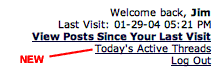
Comment